Find the time hiding in your data.
Pylon logs every autocross run on your iPhone: timing, GPS, g-forces, video, and data from your car. Then its Coach works through it and tells you where you lost time, why, and what to try on the next run.
You're on the list.
Invites go out in small rounds over the off-season. If you're picked, Apple's TestFlight emails you an invite to install Pylon. Nothing to do until then.
That didn't send.
Email support@pylonautocross.com with "Beta" in the subject and you'll be added by hand.
Not just data. Answers.
It finds the time.
Every run is compared with your own best runs. Pylon ranks the spots where you lost time, so you know which one to work on first.
It tells you why.
Each finding says what you and the car were doing there, like braking early, lifting in the slalom, coasting, or wheelspin. Tap it and the traces, map, and video jump to that spot for a closer look.
It logs it all, hands-off.
Timing, GPS, g-forces, and video on every run. Connect a supported OBD or CAN adapter and Pylon adds data from your car: throttle, brake, steering, wheel speeds, and any other CAN bus signal you set up. Set markers once and every run is timed and recorded on its own. No laptop needed.
How a run works
- 1
Set markers once
Mark the start and finish for the course and Pylon can place the sectors for you. That's your setup for the day.
- 2
Drive
Mount the phone and go. Pylon times the run automatically and records everything you've connected: GPS, g-forces, video, and data from your car.
- 3
Check in with the Coach
Back in grid, open the run. The Coach turns the data into a short, ranked list of where you lost time.
- 4
Go faster
Take the top finding into your next run. The live delta bar shows if it worked.
From data to a plan for your next run
After each run, the Coach reviews your data and finds where the time went: corners, slaloms, braking, wheelspin, etc. Every trace is still there when you want to dig in.
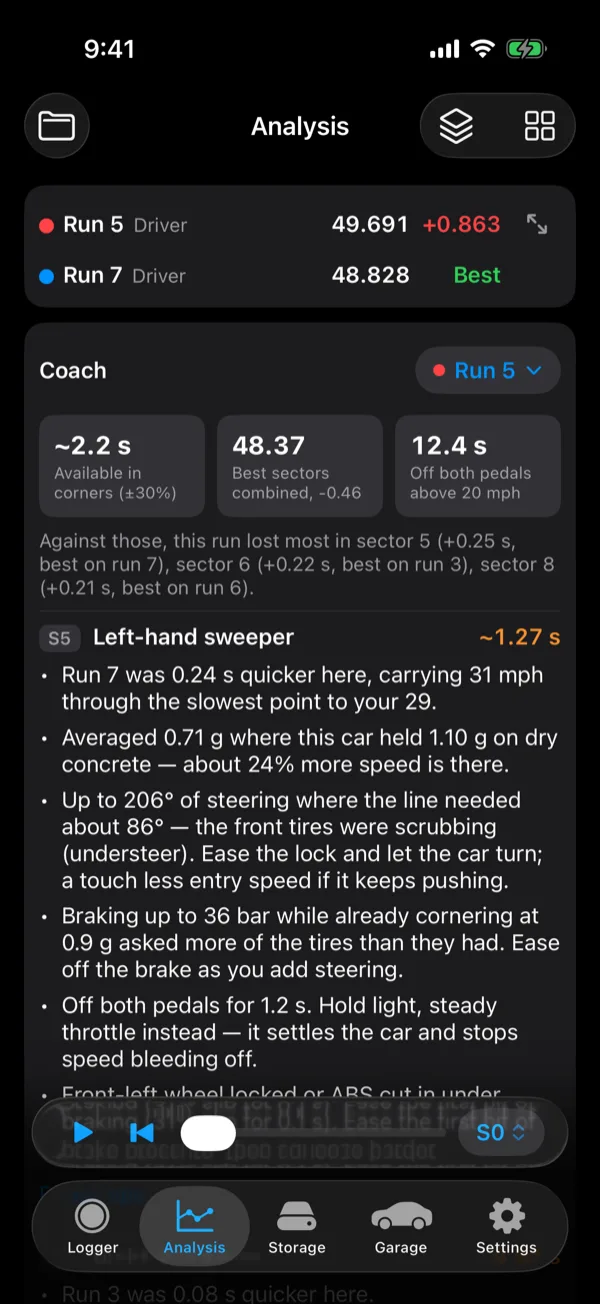
Run 5 vs your best
Real findings from a real run*
- 1Left-hand sweeper~1.27 sAveraged 0.71 g where this car held 1.10 g. Up to 206° of steering where the line needed about 86°: the fronts were scrubbing. Ease the lock and let the car turn.
- 2Right-hand turn~0.30 sAbout 14% more speed is there. 182° of steering where the line needed about 96°: understeer again.
- 3Right-hand sweeper~0.24 sOff both pedals for 2.8 s, then on and off the throttle 3 times. Pick one steady throttle position.
Tap a finding and the traces, map, and video all jump to that spot for a closer look.
And when it goes wrong, it tells you why.*
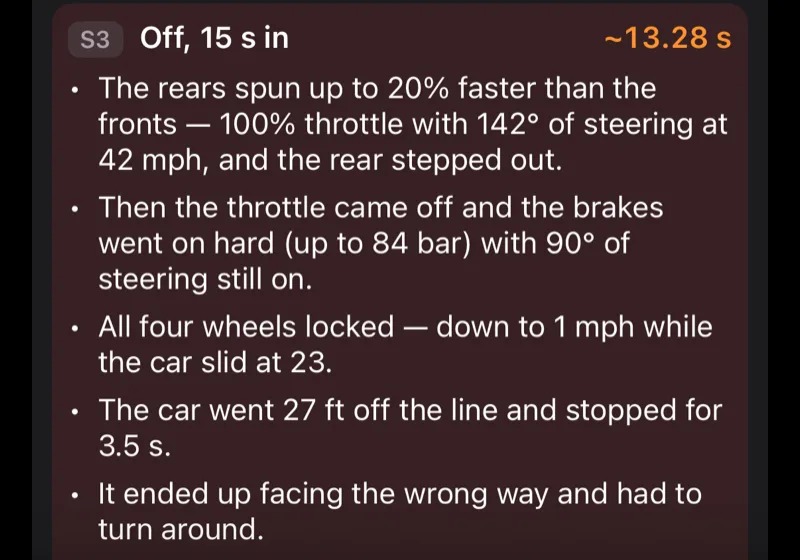
What it does today
- Coach
- Ranked findings on where each run lost time against your own best runs
- What you and the car were doing there, and roughly how much time it cost you*
- Runs on the phone, offline
- Timing
- Automatic staging, start, and finish from your course markers
- Run times, sector times, and a live delta bar against your best run
- Cones and DNFs
- Video
- Records each run on the iPhone camera or a supported external camera
- Exports video with a telemetry overlay
- Analysis
- Speed, lateral and longitudinal G, traction circle, sector analysis, and more
- Engine RPM, throttle, brake, steering, and wheel speeds on supported cars, plus any CAN bus signal you set up
- Compare runs and drivers side by side
- Your data stays yours
- Everything is stored on your phone, no account needed
- Back up and restore all events, runs, and video with one file
Works with
Pylon is built to work with the gear drivers already own. Here's what works today and what's on the way.
GPS and motion
- RaceBox Mini, Mini S, and Micro
- Your iPhone
Car data
- OBDLink MX+
- WiCAN
- OBDLink CX Coming later
Cameras
- GoPro HERO9 Black and newer
- Your iPhone
- Insta360 Coming later
Straight talk: timing from the phone's GPS alone can still be off by up to about a second. A RaceBox gives the most accurate timing.
Running something else?
Tell us what's in your car when you sign up. What drivers already own decides what gets supported next.
Coming later
- Cloud backup and sync
- A web app for analyzing runs on a bigger screen
Join the beta
The beta runs on Apple TestFlight over the 2026–27 off-season, ahead of the App Store release planned for spring 2027.
The first round is small, and knowing your car and hardware helps us pick testers.
Have an iPad? Pylon runs on it too. The layout is made for iPhone for now, but iPad testers are welcome.
You're on the list.
Invites go out in small rounds over the off-season. If you're picked, Apple's TestFlight emails you an invite to install Pylon. Nothing to do until then.
That didn't send.
Email support@pylonautocross.com with "Beta" in the subject and you'll be added by hand.